E-mail notification
You can use this feature if you want to receive a notification-mail to another email. This notification will be sent when new messages arrives* to your Inbox. Go to Settings / Folder Preferences to activate this feature:
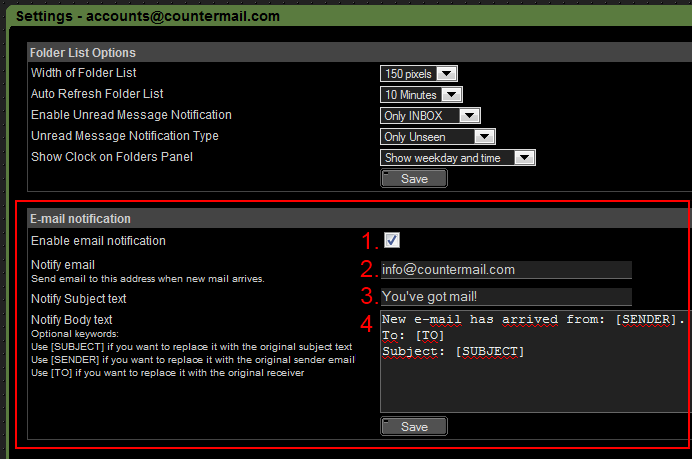
Functionality
- The first time you enable a notification, an confirmation email will be sent to the other email address. The owner must login and confirm the request by clicking on the activation link.
- Enter a valid email address (you can not enter multiple addresses)
- Enter the subject text that you want. It's possible to use keywords (read more below).
- Enter the body text that you want. There are some optional keywords you can use, if you add the word [SENDER] it will be replaced with the sender email. The word [SUBJECT] will be replaced with the original Subject text. The word [TO] will be replaced with the original receiver email.
Click on [Save] to store the settings.
*=There is a delay between 1-6 minutes before the notification is sent. This delay is made on purpose to increase the protection against backtracking. Only new & unread messages will be notified, if you read the message before the notification is processed, no notification will be sent.
|
| | Last update Sep 15, 2026 (ChangeLog)
News
2026-09-13
Changed our SSL/TLS certificate.
2026-03-12
Changed DNS record for DANE.
2025-11-05
Some accounts have corrupt index files
2025-04-30
Fixed delivery problems for some providersemail. 2024-06-18
BTC payment disabled for new accounts.
2024-04-05
Session error, read more here..
2024-03-26
Updated one FAQ about email decryption/moving emails
2024-03-17
Domain-owners!: Setup your domain correctly
2024-03-14
Slow servers.. Updated!
2024-03-05
Our servers was upgraded today, read more here..
2024-02-04
Fixed issue with invitations
2023-03-31
Planned server relocation |
